
Instagram Stories have become one of the most common ways to share everyday updates, announcements, photos, and short videos. However, Instagram normally lets users see who has viewed their Stories. This can make some people hesitant to open a Story, especially when they prefer browsing without using their personal account.
This is where InSnoop comes into the picture.
InSnoop is a web-based Instagram Story viewer that claims to let users browse Stories and Highlights from public Instagram profiles without logging into an Instagram account. It also offers options to download supported photos and videos.
What Is InSnoop?
InSnoop is an online Instagram Story viewer available through its website, insnoop.com. It is designed for people who want to access publicly available Instagram Stories and Highlights without opening the Instagram application or signing into their personal accounts.
Unlike Instagram, where users generally need an account to interact with Stories, InSnoop provides a separate search-based interface. Users can enter a public Instagram username and check whether the website can retrieve available Stories and Highlights.
The platform focuses mainly on anonymous viewing and media access. It does not function as a complete Instagram alternative and does not provide features such as direct messaging, following accounts, commenting, or managing an Instagram profile.
Some of the main things InSnoop advertises include:
- Anonymous Story Viewing: Browse available Stories without signing into your Instagram account.
- No Registration: You do not need to create an InSnoop account to use its main viewing features.
- Public Profile Access: Search for public Instagram accounts using their usernames.
- Highlights Viewer: Explore available Story Highlights from public profiles.
- Media Downloads: Download supported Story photos and videos.
- Browser-Based Access: Use the service through a web browser without installing additional software.
- Free Access: Its main features are advertised as free to use.
One important thing to understand is that InSnoop is an independent third-party service, not an official Instagram product owned or operated by Meta.
How Does InSnoop Work?
InSnoop follows a relatively simple process. Instead of asking users to connect their Instagram accounts, it provides a search box where they can enter the username of a public Instagram profile.
The website then attempts to retrieve the available content associated with that profile and displays supported Stories or Highlights through its interface.
For example, if you want to check publicly available Stories from a creator or business account, you can enter its Instagram username into the search box and see whether InSnoop can retrieve the content.
The general process involves three steps:
- Profile Search: Enter the username of the public Instagram account you want to explore.
- Content Retrieval: The service attempts to find publicly accessible Stories and Highlights associated with that account.
- Viewing or Downloading: Open the available content and use the supported viewing or download options.
The important distinction is that InSnoop does not give you access to every Instagram profile or every piece of content. Results depend on public availability and whether the service can retrieve the requested media.
It is also worth remembering that third-party viewers may use cached content. Therefore, a Story appearing on InSnoop does not necessarily mean it is still available on Instagram at that moment.
How to Use InSnoop to View Instagram Stories?
One reason people look for InSnoop is its straightforward interface. You do not have to create another account or go through a lengthy registration process before searching for a public profile.
Here is how you can try it:
Step 1: Visit the InSnoop Website
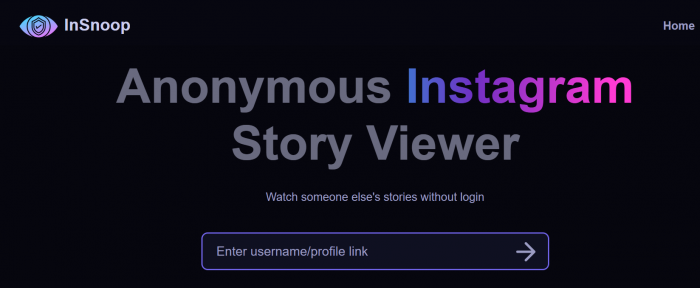
Open your preferred web browser and visit https://insnoop.com/.
You will find a search section on the homepage where you can enter an Instagram username.
Step 2: Enter an Instagram Username
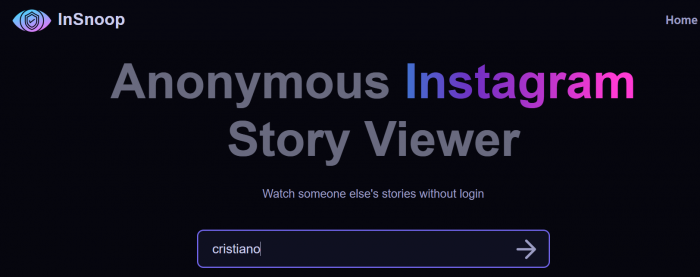
Type the username of the public Instagram account you want to check.
Make sure you enter the correct spelling. An incorrect username may return an error or no matching profile.
Step 3: Search for the Profile
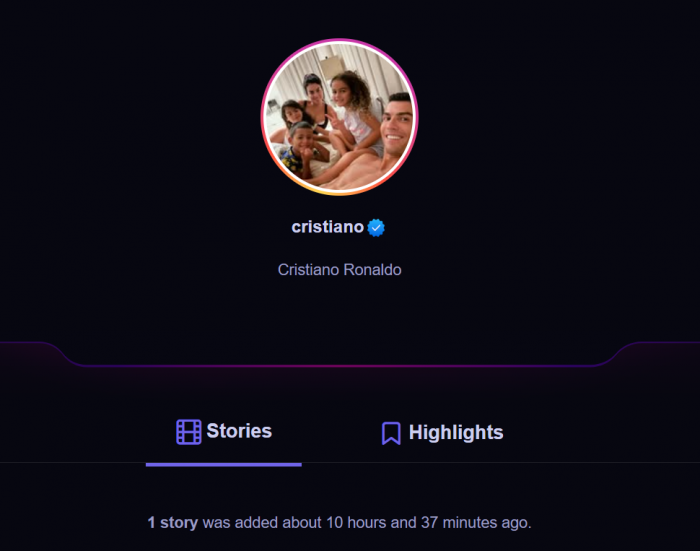
Submit your search and allow the website to process the request.
If the profile and its content are accessible, InSnoop may display the available account information and Stories.
Step 4: Open Available Stories
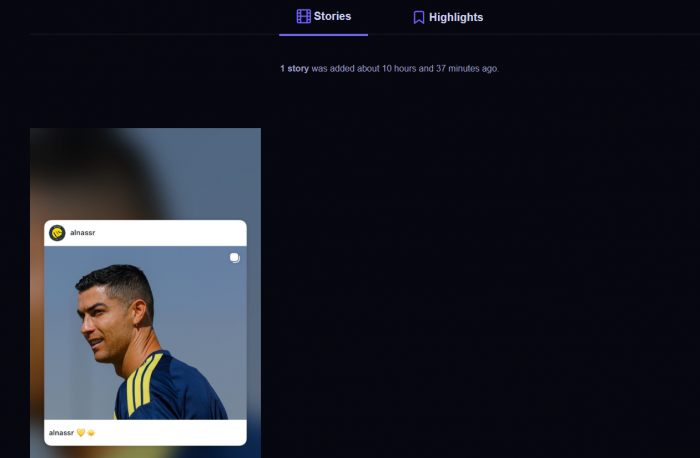
Select the Story you want to view. The website provides a viewing interface for supported content.
Step 5: Download Media If Needed
If a download option is available, you can use it to save supported photos or videos to your device.
Key Features of InSnoop
InSnoop focuses on a few specific functions instead of offering a complete Instagram management platform. Here is a closer look at the features that make it interesting to users.
1. Anonymous Instagram Story Viewing
Anonymous Story viewing is the primary feature promoted by InSnoop.
Normally, when you view someone's Instagram Story through your logged-in account, your username can appear in their viewer list. InSnoop claims to provide an alternative by allowing visitors to access public Stories without connecting their personal Instagram accounts.
This can be useful for people who want to browse public updates without directly interacting with an account.
However, anonymous viewing should not be confused with complete online anonymity. The website and its advertising or analytics providers may still process technical information about visitors.
2. Instagram Highlights Viewer
Instagram Highlights allow users to keep selected Stories visible on their profiles even after the usual 24-hour Story period.
InSnoop also advertises support for viewing Highlights from public profiles.
This can be useful when you want to explore older collections, such as:
- Travel experiences and saved memories.
- Business announcements and product information.
- Frequently asked questions.
- Tutorials and educational content.
- Event updates and promotional collections.
The availability of individual Highlights depends on whether InSnoop can retrieve the content.
3. Story Photo and Video Downloads
Another feature advertised by InSnoop is the ability to download supported Instagram Story media.
Instead of simply viewing a photo or video online, users may be able to save the available file to their devices.
The website identifies JPEG as its image format and MP4 as its video format.
This can be convenient when someone wants to keep a copy of publicly available content for personal reference. However, download availability is not guaranteed, and a download button does not necessarily mean every file will save successfully.
Always respect the original creator's copyright and obtain permission before reusing or publishing their content.
4. No Instagram Login Required
InSnoop does not require users to enter their Instagram username and password to access its advertised viewing features.
This is an important difference between the service and third-party applications that request direct access to social media accounts.
Not having to provide Instagram credentials reduces the risk associated with sharing your password with an unfamiliar service.
Still, it is important to remember that not requesting an Instagram password does not mean the website collects no information whatsoever.
5. Browser-Based Access
InSnoop works through a web browser, so there is no need to install a separate desktop program or mobile application to try its main features.
You can open the website on a supported browser using:
- Windows computers.
- Mac computers.
- Android smartphones.
- iPhones and iPads.
- Tablets with internet access.
The actual experience may vary depending on your browser, internet connection, and the availability of the website.
6. Free Access
InSnoop advertises its main viewing features as free. Users can search for public profiles without purchasing a subscription or completing a paid membership process.
However, free access does not automatically mean an advertisement-free experience. Third-party websites may use advertising to support their operations.
Can You View Private Instagram Accounts With InSnoop?
No. InSnoop is intended for accessing publicly available Instagram content. It does not provide legitimate access to private profiles or content restricted to approved followers.
Instagram's privacy settings are designed to let account owners control who can see their posts and Stories.
For example, if someone has a private account, their Stories are generally available only to approved followers. Similarly, Close Friends Stories are restricted to the selected audience.
InSnoop cannot legitimately bypass these restrictions.
Be careful with websites or applications claiming that they can unlock private Instagram accounts just by entering a username. Such promises are a major warning sign, particularly when the service asks you to complete suspicious surveys, install unknown applications, or provide personal information.
Is InSnoop Really Anonymous?
This is probably the most important question for anyone considering using the platform.
InSnoop advertises anonymous Instagram Story viewing. Since it does not require visitors to sign into their personal Instagram accounts, their personal Instagram username is not directly used in the usual way it would be when viewing a Story through Instagram.
However, there are two different types of privacy to understand.
1. Privacy From the Instagram Account Owner
InSnoop claims that users can view available public Stories without appearing in the account owner's usual Instagram Story viewer list.
This is the main reason people search for anonymous Story viewers.
However, this should be treated as the website's claim rather than an independently guaranteed result for every session.
2. Privacy From the Website
Even if you do not log into Instagram, the website you visit may still process information such as your IP address, browser type, device information, and website activity.
Advertising and analytics providers may also collect certain technical information.
Therefore, using InSnoop without an Instagram login does not mean that your online activity is completely invisible.
My advice is to avoid treating any third-party Story viewer as a guaranteed privacy solution.
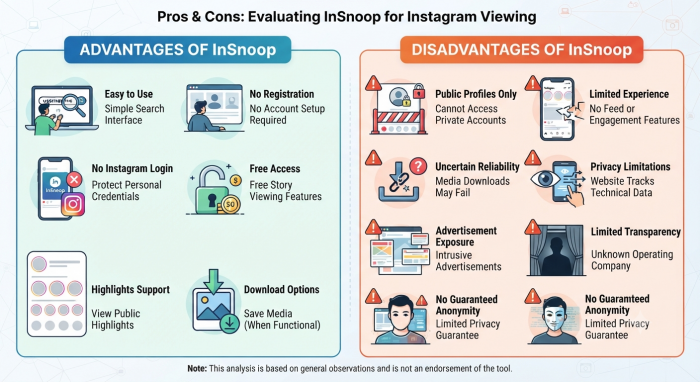
Advantages and Disadvantages of InSnoop
Before deciding whether to use InSnoop, it helps to look at both its strengths and weaknesses.
Advantages
- Easy to Use: Its search-based interface makes the process relatively straightforward.
- No Registration: You do not need to create another account to try its main features.
- No Instagram Login: It does not require your personal Instagram credentials.
- Free Access: Its advertised Story-viewing features are available without a paid subscription.
- Highlights Support: You can try viewing available Highlights from public profiles.
- Download Options: Supported photos and videos can be downloaded when the feature works.
- Multiple Devices: It can be accessed through a browser on computers, tablets, and smartphones.
Disadvantages
- Public Profiles Only: It cannot legitimately show content from private accounts.
- No Complete Instagram Experience: It does not replace Instagram's feed, messaging, or engagement features.
- Uncertain Download Reliability: Some media may not download successfully.
- Privacy Limitations: The website may still process technical and browsing information.
- Advertisement Exposure: Ads may affect the user experience.
- Limited Transparency: The website does not clearly identify its operating company.
- No Guaranteed Anonymity: Its anonymous-viewing claims should not be treated as an absolute privacy guarantee.
InSnoop vs. Instagram: What Is the Difference?
Although both services relate to Instagram content, their purposes are quite different.
| Feature | InSnoop | |
|---|---|---|
| Account required | No account required for advertised viewing | Account required for normal account-based access |
| Story viewing | Available public Stories | Stories available according to Instagram access and privacy settings |
| Anonymous viewing | Advertises anonymous viewing | Logged-in viewers can appear in the viewer list |
| Private profiles | No legitimate access | Approved followers can access private content |
| Story Highlights | Advertised support | Supported |
| Media downloads | Offers supported download options | No general built-in option to download other users' Stories |
| Messaging | Not supported | Supported |
| Following accounts | Not supported | Supported |
| Content interaction | Limited to viewing and available downloads | Likes, comments, replies, sharing, and more |
The main difference is that Instagram is a complete social networking platform, whereas InSnoop focuses on viewing publicly available Story content through an external website.
If you want to interact with creators, follow accounts, or manage your own content, Instagram remains the appropriate platform.
Final Verdict: Is InSnoop Worth Trying?
InSnoop is an interesting option for people who want to browse publicly available Instagram Stories and Highlights without signing into their personal Instagram accounts.
Its biggest advantage is simplicity. You can visit the website, enter a public Instagram username, and check whether the available content can be retrieved. It also advertises free access and media download options, which make it appealing for occasional use.
However, it is important to look beyond the anonymous-viewing claim. The service has limitations when it comes to private profiles, download reliability, website transparency, and visitor privacy. It also does not offer the complete features of Instagram or professional social media analytics platforms.
My recommendation is to consider InSnoop a basic public Instagram Story viewer rather than a tool for complete anonymous browsing or serious social media research. If you decide to try it, avoid sharing sensitive information, never enter your Instagram password, and respect the original creator's content rights.
In short, InSnoop can be useful for occasional public Story viewing, but its convenience should not come at the cost of your privacy or online safety.










Comments