
Wordle solvers have exploded in popularity over the last few years, but they’re definitely not all built with the same intentions. Some are outright answer machines designed to spill the solution instantly. Others are more subtle; they guide your thinking instead of killing the challenge.
The Try Hard Guides Wordle Solver positions itself in the second camp. Rather than spoiling the game, it tries to make you a smarter Wordle player by narrowing down guess patterns and probability outcomes.
So the big question is: Does it genuinely improve your gameplay, or is it just another flashy browser tool?
What the Try Hard Guides Wordle Solver Is Built to Do
This tool is a web-based helper where you feed in your game state:
● Green letters = correct letter + correct spot
● Yellow letters = correct letter + wrong spot
● Grey letters = not in the word at all
Once entered, the solver generates candidate words, often prioritizing letter frequency so you eliminate options faster.
Important distinction:
It doesn’t scrape or leak the daily Wordle answer.
Instead, it works off probability, filtering, and dictionary data making it more of a strategy tool than an answer key.
How It Works
1. User Inputs the Game State
The solver starts by asking the player to enter three types of information:
• Green letters: correct letter in the correct position
• Yellow letters: correct letter in the wrong position
• Grey letters: letter not contained in the word
These inputs form the foundation for the filtering process.
Example:
Green: R in position 2
Yellow: A but not in position 3
Grey: S, T, P
This already creates a structural pattern for the solver to work with.
2. Dictionary Filtering of Candidate Words
Once the inputs are provided, the solver scans its internal five-letter word list and removes words that violate the rules provided by the player.
Filtering occurs across three layers:
Layer A: Position Matching for Green Letters
If the user confirms that R belongs in slot 2, then only words with R in that exact position remain in the candidate pool.
Layer B: Position Excluding for Yellow Letters
If A is yellow in position 3, the solver ensures that A remains in the word but cannot appear in slot 3.
Layer C: Removal of Words Containing Grey Letters
All words containing eliminated letters are removed, except in specific cases related to duplicate handling (covered in the next section).
3. Handling of Duplicate Letters
Wordle frequently includes words with double letters such as SHEEP, CARRY or BUDDY.
To avoid incorrect eliminations, the solver applies rules such as:
• A letter may appear twice even if one position marked it as grey
• A yellow letter may appear more than once in different slots
This helps prevent over-filtering and maintains accuracy.
4. Ranking Candidates by Frequency and Probability
After filtering the word pool, the solver ranks the remaining words using letter frequency and probability logic.
This considers:
• how often specific letters appear in English five-letter words
• typical vowel to consonant distribution
• common Wordle patterns
• how effective a word is at reducing the remaining search space
High-value letters such as A, E, O, R, T, L, S and I tend to appear near the top of suggested guesses because they eliminate more possibilities early on.
5. Real-Time Recalculation
Every time the player updates the clue inputs, the solver recalculates and refreshes the filtered word pool.
This gives the tool an interactive feel and allows users to experiment without refreshing the page or reloading data.
6. It Does Not Retrieve the Official Daily Answer
The solver does not collect or reveal the official Wordle solution for that day.
It operates only through probability and filtering rather than answer scraping.
This is why many players view it as a learning tool rather than a direct cheat mechanism.
7. Gradual Improvement in Player Skill
Because the solver visualizes the elimination and probability process, users naturally learn how to:
• choose strong starting words
• eliminate letters efficiently
• identify vowel placement patterns
• reduce guess space more effectively
Over time, this can improve Wordle performance even without the solver.
Where the Solver Actually Helps
Helps Build Better Guessing Strategy
Instead of dumping 200+ word options, it tends to push high-value letters like:
A, E, O, R, S, T
This mirrors how experienced players set up strong opening guesses, especially during rounds 1–3.
Clean, Non-Distracting Interface
Many solver sites overload you with banners and clickbait. Try Hard Guides keeps things minimalist, which makes it feel more like a tool, not a traffic farm.
Improves Pattern Recognition Over Time
Regular users naturally pick up patterns such as:
● optimal starter words
● frequent consonant pairings
● vowel clustering habits
● elimination-based thinking
It slowly trains you to think like a solver even when you’re not using it.
Where It Falls Short
Even useful tools have weak spots:
Dictionary Doesn’t Always Align With Wordle
On rare occasions, the solver suggests words the official Wordle game rejects. This hurts most during final guesses where precision matters.
Mobile Experience Isn’t Ideal
On smaller screens:
● inputs feel cramped
● interactions can misfire
● scrolling feels tight
Desktop users get a noticeably smoother experience.
Can Be Limited in Edge Cases
When very narrow word patterns appear (e.g., -IGHT, -OUND, -ERSE), the solver occasionally cycles through similar guesses instead of branching out to help eliminate.
None of these are dealbreakers, but they do affect usability in tight scenarios.
Tips to Get the Best Value Out of It
If you’re planning to use this solver, these tips will keep the fun intact:
● Make 2–3 guesses first keeps the puzzle engaging
● Use it as feedback, not as a cheat code
● Double-check suggestions in late game
● Prefer desktop for smoother input
● View it as a learning companion
What Other Users Say About It
Positive Impressions from Reviews
Several user experiences and review sites highlight strengths of the Wordle solver functionality on Try Hard Guides:
1. Strategic Learning Rather Than Just Answers
Reviewers appreciate that the solver does more than list possible words. It tends to explain reasoning and helps players think more strategically rather than just handing them answers. This keeps the gameplay educational and helps players recognize patterns. Users who prefer developing their word skills find this approach valuable rather than simply copying a solution. (TopSEOTools.io)
2. Clean Interface and Usability
Compared to many online tools that bombard users with ads and pop-ups, Try Hard Guides’ solver is frequently praised for having a cleaner, easier-to-navigate layout. This makes the experience smoother and less distracting for players trying to work through their Wordle puzzles.
3. Improves Player Insight Over Time
Reviewers note that regular use of the solver can improve a player’s understanding of Wordle strategies over time. Instead of just giving answers, it helps players identify common high-frequency letters and letter placements, which in turn sharpens their gameplay even when they’re not using the tool.
Common Criticisms and Negative Feedback
Across different review sources, some common drawbacks and user frustrations arise:
1. Occasional Accuracy or Technical Issues
Some users report that the solver can suggest words that are not accepted by the official Wordle dictionary, which can be frustrating especially in later guesses when precision matters most. This doesn’t break the tool, but can lead to wasted guesses if players rely on those suggestions. (TechRaisal)
2. Mobile Experience Issues
A repeated complaint is that the solver doesn’t work as smoothly on mobile devices as it does on desktops. Buttons may feel cramped and inputs can be less responsive on smaller screens, leading to a less optimal experience for those playing on phones or tablets.
3. Reliance on Strategy versus Direct Answers
While many praise the solver’s supportive teaching approach, some users who want direct, guaranteed answers find this method less helpful. Tools that prioritize strict dictionary matches or more direct output may feel more reliable for players focused strictly on results. (Quarule)
General Sentiment from Community and Broader Commentary
Community Views on Solvers and Tools
Outside strict reviews, broader discussions around Wordle and similar solvers generally reflect this dual perspective: solvers can improve strategic thinking if used responsibly, but heavy reliance on them may dilute the satisfaction of solving puzzles independently. Some commentators compare using solver tools to using navigation aids in a real-world task; they help avoid dead ends but shouldn’t replace core problem-solving skills. (FirmSuggest)
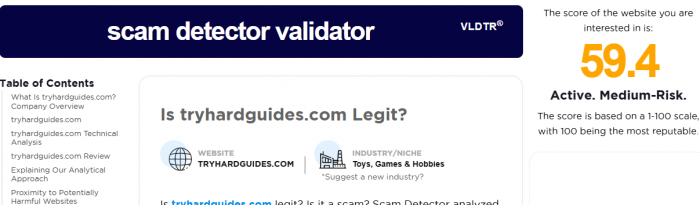
Reviews from broader site audits also note that while Try Hard Guides provides legitimate utility tools, some external reviewer ratings suggest medium trust scores for the site itself based on automated scanning tools that analyze website risk factors. That means users should be cautious about site safety and ensure they use it responsibly, just as they would with any online tool. (Scam Detector)
Alternatives Worth Exploring
Here are some tools and games often compared to it:
| Platform | What It Offers | Why Consider It |
| NYTimes Wordle | Official puzzle + daily streaks | Pure, authentic gameplay |
| Nerdle | Solve math equations | Ideal for number-thinkers |
| Quordle | Solve 4 Wordles at once | Higher difficulty, more chaos |
| Capitalize My Title Solver | Solver + hints + word databases | Wider game compatibility |
| Mashable Wordle Tips | Strategy advice from editors | Great for players, not cheaters |
Each alternative caters to a different style from competitive play to pure learning.
When This Solver Makes the Most Sense
It’s a good pick if you:
● enjoy Wordle casually
● like learning rather than auto-solving
● want clean UI without pop-ups
● appreciate probability-based suggestions
But it’s not ideal for players who:
● need guaranteed answers
● prioritize strict Wordle dictionary accuracy
● play competitively or speed-run
Final Verdict
The Try Hard Guides Wordle Solver doesn’t try to replace Wordle it tries to teach you how to think better about Wordle.
Think of it as:
● a strategy enhancer
● a learning companion
● a pattern recognition coach
Not as:
● a cheat engine
● an automated answer generator
For casual improvement and lightweight help, it’s a solid pick.
Frequently Asked Questions
Q1: Is it free to use?
Yes. No login or subscription required.
Q2: Does it work on mobile?
Yes, but the desktop experience is smoother.
Q3: Does it always suggest valid Wordle answers?
Not always there are occasional dictionary mismatches.
Q4: Can it work for other word games?
It can, but it’s optimized specifically for Wordle structure.
Q5: How does it choose suggestions?
Through probability filtering, letter frequency analysis, and player-provided feedback.






Comments