
If you’re an IndianOil dealer, distributor, or business partner, chances are you’ve already heard about the SDMS PX IndianOil eDealer_ENU portal. It’s part of Indian Oil Corporation’s (IOCL) push to digitize operations across its vast distribution network. But what exactly does this platform do? How can you access it? And how does it help streamline your daily business activities?
Let’s break it all down.
What is SDMS PX IndianOil eDealer_ENU?
The name may sound complicated, but it’s actually straightforward once you unpack it:
- SDMS stands for Sales and Distribution Management System.
- PX refers to the partner or product exchange interface.
- eDealer_ENU indicates the English-language version of the dealer portal.
In short, SDMS PX IndianOil eDealer_ENU is an online platform designed for IOCL dealers and distributors to handle everything from inventory tracking to order management and invoice generation. It’s part of IndianOil’s mission to create a paperless, transparent, and efficient workflow for its dealer network.
Who Can Use the Portal?
The platform is built exclusively for IndianOil business partners, such as:
- Registered dealers and distributors handling fuels, lubricants, or LPG.
- Channel partners, transporters, or service providers linked with IOCL.
- Authorized staff within dealership operations, depending on assigned user roles.
It’s not open to the public or for new dealership applications. Instead, it helps existing dealers manage and automate their ongoing business operations.
Key Features of SDMS PX IndianOil
Here’s what makes this system so useful for dealers and distributors:
a) Inventory & Stock Management
Keep a real-time view of your product inventory, stock levels, and reorder needs. The system helps you place restock requests directly, reducing manual paperwork.
b) Order Placement & Tracking
Raise new orders for products, check their approval and dispatch status, and monitor delivery timelines without having to call regional offices.
c) Billing, Invoicing & Payments
Generate GST-compliant invoices, download records, and view payment histories. This feature helps you maintain up-to-date accounts and avoid reconciliation errors.
d) Reporting & Analytics
Access dashboards that show sales data, daily performance summaries, outstanding payments, and customer transaction details—all in one place.
e) User & Dealer Account Management
Manage your account settings, reset passwords, assign roles to employees, and handle dealership information.
Why the Portal Matters for Dealers
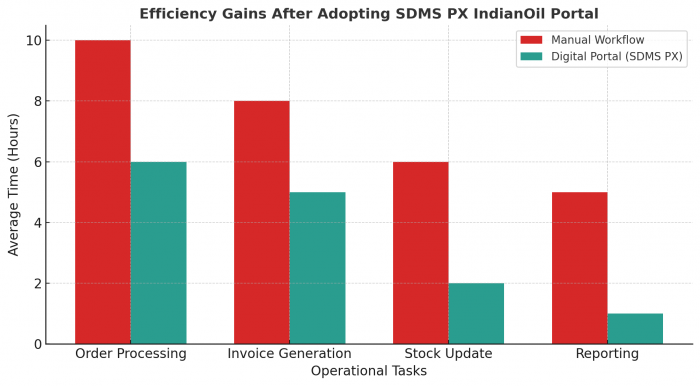
The SDMS PX system offers more than just convenience; it’s a business essential in today’s fast-changing fuel sector.
- Efficiency: Automates routine tasks like order entry and invoice generation.
- Transparency: Reduces dependency on paper and manual communication.
- Data Accuracy: Keeps inventory and billing information updated in real time.
- Faster Decisions: Built-in analytics help identify trends and improve planning.
- Better Service: Faster turnaround times mean happier customers and improved reputation.
How to Access and Use the Portal
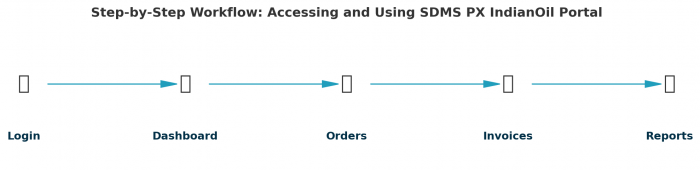
Here’s a simple step-by-step guide:
Step 1: Login
Visit the SDMS PX portal (usually at the sdms.px.indianoil domain) and enter your credentials — a User ID and Password provided by IOCL.
If this is your first time logging in, you’ll be prompted to change your password and verify security details.
Step 2: Explore the Dashboard
Once inside, you’ll see a dashboard with options like Orders, Inventory, Invoices, Reports, and Settings.
Use these to place orders, check payments, download reports, and track stock levels.
Step 3: Regular Usage
- Log in daily to keep tabs on your inventory and new notifications.
- Export monthly sales reports for audits or record-keeping.
- Manage your staff’s access levels using the User Management section.
Common Issues and Fixes
Even a well-designed system can have hiccups. Here are some common issues dealers face:
- Login Problems: Often caused by expired passwords or browser cache. Try clearing cookies or switching browsers.
- Portal Not Loading Properly: Use updated browsers like Chrome or Firefox. Older browsers can cause display issues.
- Data Mismatch: If your digital invoices or orders differ from physical records, raise a service ticket within the portal.
- Forgot Password: Use the password reset feature or contact your regional IOCL office for assistance.
Tips to Get the Most Out of the Portal
- Bookmark the login page for quick access.
- Download important invoices and reports monthly for your records.
- Train your staff so they can manage orders and reports independently.
- Always double-check product quantities before submitting orders.
- Update your contact and business details regularly to avoid communication gaps.
Challenges You Might Encounter
Like any enterprise software, the SDMS PX portal has its growing pains:
- Slow Performance: During high-traffic hours, page loads may be delayed.
- Limited Mobile Optimization: It works on mobile browsers, but the desktop version is far smoother.
- Learning Curve: Smaller dealerships may need initial training to get used to the interface.
- Occasional Lag in Data Sync: Some updates (especially delivery confirmations) may take a few minutes to reflect
However, IOCL continues to refine and improve the system, and many of these issues are already being addressed in newer updates.
The Bigger Picture: Why It Matters
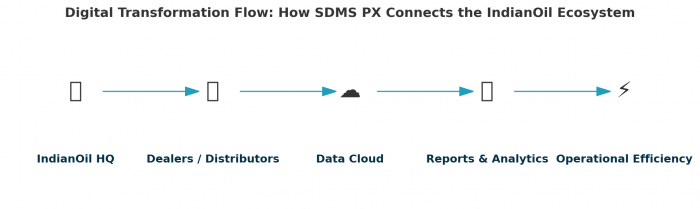
For decades, dealer operations in the fuel industry were paper-heavy and time-consuming. The SDMS PX eDealer_ENU portal changes that by providing:
- A unified digital system for all key dealer tasks.
- Real-time visibility across supply chain and billing operations.
- Better accuracy, accountability, and compliance with IOCL’s systems.
For dealers, adopting this portal isn’t just about efficiency; it’s about staying competitive in a rapidly digitizing energy sector.
Final Thoughts
The SDMS PX IndianOil eDealer_ENU portal is more than just a login page—it’s the digital command center for every IOCL dealer. Whether you manage fuel supply, lubricants, or LPG, this platform helps streamline your day-to-day work, keep records organized, and maintain transparency with the corporation.
If you haven’t fully explored it yet, start today. Learn its dashboard, get comfortable with its features, and make it a routine part of your operations.
In a world where digital efficiency defines success, mastering this portal could be your dealership’s biggest advantage.
FAQs
Q1. Who can access the SDMS PX IndianOil eDealer_ENU portal?
Only registered dealers, distributors, and authorized IOCL partners.
Q2. Can I apply for a new dealership through this portal?
No, this is strictly for existing partners to manage operations.
Q3. Is there a mobile app available?
Currently, it’s web-based but accessible on most mobile browsers.
Q4. What should I do if I can’t log in?
Ensure you’re using updated browser settings, clear your cache, or contact your regional IOCL support.
Q5. How secure is the system?
The portal follows IOCL’s internal security and data management standards, ensuring that dealer data is encrypted and protected.




Comments